
Download PayDay APK – finance app, budget tracker, money management, personal finance, financial planning
Overview
PayDay is a free Android application designed to assist users in managing their personal finances more effectively. The app addresses common financial challenges such as running out of money before the next payday, overspending, and difficulty tracking daily budget limits. By allowing users to input their expected salary, available budget, and savings goals, PayDay provides a structured framework for financial planning.
It is particularly suited for individuals seeking a straightforward way to monitor their spending habits and maintain financial discipline. The app’s primary function is to offer visual insights into financial inflows and outflows, enabling users to make informed decisions about their money usage. It serves as a practical tool for budget-conscious consumers, young professionals, and anyone aiming to improve their financial habits.
Although the developer, oleksandr.info, is not widely recognized in mainstream tech circles, the app’s clear purpose and focused functionality suggest a targeted approach to personal finance management. Real-world usage scenarios include tracking daily spending, setting monthly savings targets, and adjusting spending behavior based on real-time financial feedback. The app’s simplicity makes it accessible for users with minimal financial literacy.
Key Features & Capabilities
- Salary and Budget Input – Users can define their expected monthly salary and available budget, which serves as the foundation for all financial tracking.
- Savings Goal Setting – The app allows users to specify how much they wish to save each month, helping to reinforce long-term financial habits.
- Visual Financial Tracking – PayDay displays financial data through clear visualizations, making it easier to understand spending patterns and remaining balances.
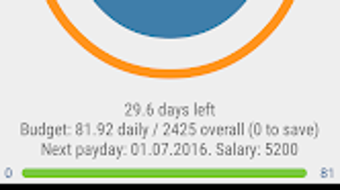
- Daily Budget Calculation – Based on the monthly salary and savings target, the app calculates a daily spending limit to help users stretch their money through the month.
- Real-Time Financial Monitoring – Users can track their expenses and see how their spending aligns with their budget in real time.
These features collectively support users in maintaining control over their finances. For example, a user earning a fixed monthly income can enter their salary, set a savings goal, and immediately see how much they can spend each day without exceeding their budget. The visual feedback helps users identify areas of overspending and adjust their behavior accordingly.
This functionality is especially beneficial for individuals managing tight budgets or those new to financial planning. The app does not include advanced features such as bill reminders or investment tracking, but its focused approach ensures a streamlined experience. By concentrating on core budgeting and visualization, PayDay remains accessible and efficient for its intended audience.
User Interface, Workflow & Performance
PayDay features a clean and minimalistic user interface, designed to prioritize clarity and ease of use. Navigation is straightforward, with key functions accessible through a central dashboard. Users can input their salary, budget, and savings goals with minimal steps, and the app instantly generates visual representations of their financial status.
The workflow is linear and intuitive, guiding users through the setup process and daily tracking without requiring extensive onboarding. While detailed performance metrics were not provided, the app’s lightweight design—reported at 10 MB—suggests efficient resource usage. It is likely to run smoothly on a wide range of Android devices, though exact CPU and RAM behavior remains unspecified.
The developer did not include information on stability or crash frequency. General software behavior patterns suggest that lightweight budgeting apps typically maintain stable performance under normal use. However, users should be aware that performance may vary depending on device specifications and background app activity.
The app’s design emphasizes usability over complexity, making it suitable for users who prefer a no-frills financial tool.
Compatibility & System Requirements
PayDay is designed for Android devices and is compatible with the Android operating system. The app’s version is listed as 1.0, indicating it is a stable initial release. It has a file size of 10 MB, which is relatively small and suitable for devices with limited storage.
The developer did not specify exact system requirements, such as minimum Android version or hardware specifications. As such, compatibility information is limited to the provided OS. Users are advised to check their device’s Android version to ensure compatibility.
The developer did not provide details on whether the app supports tablets or other Android-based devices. Installation is straightforward, and the app can be downloaded directly from trusted sources. Without further details, users should consider the app’s lightweight nature as a positive indicator of broad compatibility.
Pros and Cons
Pros
- Free to download and use with no hidden costs
- Simple, intuitive interface ideal for beginners
- Lightweight design at only 10 MB
- Clear visualizations aid in understanding financial limits
- Focuses on core budgeting and daily spending tracking
Cons
- No advanced financial features such as bill reminders or investment tracking
- Exact system requirements were not specified
- Limited customization options for budget categories
- Developer background and support details are not publicly available
- Performance details on different devices were not provided
FAQ Section
Is PayDay available for iOS devices?
PayDay is currently designed for Android only. There is no official version available for iOS devices.
Is the app secure to use?
PayDay does not store user data on remote servers, which reduces the risk of data breaches. However, the developer did not provide specific security details such as encryption or data handling practices.
How often should I update the app?
Users are encouraged to keep the app updated to benefit from potential bug fixes and performance improvements. Updates are typically released when new features or stability enhancements are introduced.
Does PayDay require an internet connection?
The app functions primarily offline. Users can input data, track spending, and view financial summaries without an active internet connection.
Can I use PayDay without creating an account?
Yes, PayDay does not require users to create an account or provide personal information. All data is stored locally on the device.
Final Thoughts + CTA
PayDay delivers a focused and accessible solution for individuals seeking to improve their financial discipline through simple budgeting tools. Its lightweight design, intuitive interface, and clear visual feedback make it a strong choice for users who want to track their daily spending and avoid running out of money before payday. While it lacks advanced features, its simplicity is its greatest strength.
The app is particularly beneficial for beginners in personal finance, young adults managing their first budgets, and anyone who values a no-frills approach to money management. The fact that it is free and does not require account creation enhances its appeal. For those looking for a reliable, easy-to-use finance app that helps them stay on track, PayDay offers a solid foundation.
Download PayDay now and take control of your finances with confidence.







